Door & Window Sensors
Plan contact sensors for selected doors and windows. Discuss access routines and how each entry point should behave when the system is armed.

Home & business intrusion alarms
Plan an intrusion alarm around your entrances, indoor spaces and everyday routines. Kancam installs alarm systems with suitable sensors, practical controls and supported app features for homes and businesses.
Start with the right components
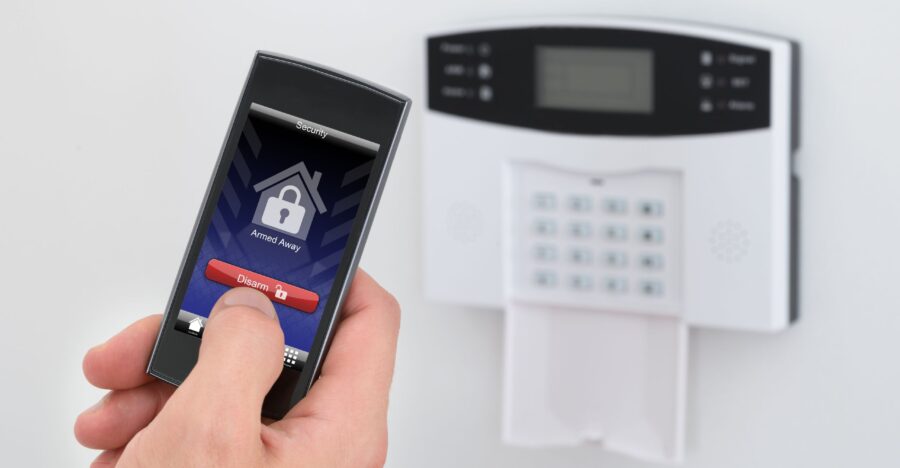
A useful intrusion alarm combines suitable detection devices with clear controls. Review entry points, normal movement and user access before selecting the system.
Plan contact sensors for selected doors and windows. Discuss access routines and how each entry point should behave when the system is armed.
Choose suitable detector positions for the spaces you want covered. Consider pets, normal movement and room conditions when selecting equipment and settings.
Discuss keypads, user codes and available mobile controls. Confirm connectivity requirements, subscriptions and compatible integrations before choosing a system.
Planning cameras alongside your alarm? Explore our security camera installation service . Alarm and camera integrations depend on the selected equipment and platform.
Different properties, different routines
Plan sensor coverage and arming routines around the people who use your property. Entry points, occupancy and access responsibilities help shape the installation.
Review accessible doors, selected windows and indoor areas. Choose controls and supported features that suit household routines.
Plan around opening and closing procedures, staff access and spaces requiring separate coverage. Discuss supported zones or partitions where appropriate.
Choose around your building
The right option depends on cable access, existing equipment and system requirements. Review installation work and ongoing maintenance before deciding.
Use physical wiring between supported devices and the panel. Review existing cable condition or new cable routes, along with panel power and backup requirements.
Use compatible radio-connected devices to reduce sensor cabling. Check signal coverage and device battery maintenance. Wireless sensor communication does not necessarily use Wi-Fi.
Combine supported wired and wireless devices where the panel allows it. This may suit selected upgrades, subject to existing sensor compatibility and equipment condition.
Already have an alarm panel? Share the panel model, existing sensors and changes you need to discuss a suitable installation or upgrade.
Discuss Your Alarm Options →Make everyday operation easier
Choose supported controls and notifications around how you use the property. Features depend on the selected panel, platform, connection and service plan.
Plan convenient keypad locations and individual codes for authorized users. Discuss who can arm, disarm or manage the system.
Review available app controls, system status and notification settings. Confirm account setup, connectivity and any subscription requirements.
Discuss supported links with cameras or other smart devices. Check specific models and platform compatibility before including integrations in the project.
Planning video alongside your alarm? Explore our security camera installation service . App notifications and alarm monitoring are separate functions; confirm any monitoring service and response arrangements in your quote.
Know what the project covers
A clear installation scope sets out equipment, placement, configuration and handover. Agree on these details before work begins.
Identify priority doors, windows and indoor areas. Review occupancy, access routines and practical installation locations.
Specify the panel, sensors, keypads and agreed accessories. Check compatibility, cable routes or wireless signal coverage.
Review panel power, supported backup options and communication paths. Confirm equipment needs and any ongoing connectivity charges.
Label sensors and configure agreed entry delays and arming modes. Set user permissions around household or business routines.
Check installed detection devices, controls and included notifications. Coordinate any monitoring tests with the relevant provider where applicable.
Review arming, disarming and everyday use. Discuss battery maintenance, support arrangements and how to update authorized users.
Get a scope for your property Share your city, property type and priority areas to discuss equipment, installation work and any ongoing services.
Request an Alarm Installation Quote →Designed for everyday use
Good planning connects detection coverage with your daily routines. The aim is a system with suitable device placement, understandable controls and clear responsibilities.
Select sensors around the entrances and indoor spaces that matter to your property. Account for practical mounting positions and everyday activity.
Plan supported modes, entry delays and controls around being home, leaving or closing the business. Clear instructions help users operate the system consistently.
Set appropriate permissions and individual codes where supported. Agree who manages users and receives notifications as household or staff needs change.
Understand device batteries, panel backup and connection requirements. Discuss system checks and support so maintenance needs are clear from handover.
From enquiry to handover
Start with your requirements, agree on the equipment and scope, then arrange installation and checks. Each stage should reflect the functions included in your quote.
Tell us your city, property type, priority entry points and access routines. Include existing panel or sensor models if you are considering an upgrade.
Discuss sensor locations, controls and wired or wireless options. Check equipment compatibility and installation access before finalizing the design.
Agree on devices, installation work and included setup. Confirm any subscriptions, monitoring arrangements and ongoing charges separately.
Mount agreed equipment, configure zones and controls, and check installed functions. Coordinate monitoring tests with the relevant provider where applicable.
Go through arming, disarming and supported notifications. Review authorized users, maintenance needs and the agreed route for support.
Ready to plan your alarm installation? Share your property details to discuss equipment options, installation availability and a project quote.
Start Your Alarm Installation →Understand your project quote
Your quote should reflect the property, selected equipment and agreed work. Review installation costs alongside any subscriptions or monitoring charges.
The panel, number of sensors, keypads and selected accessories affect the equipment scope. Additional zones or supported features may require different components.
Cable routes, mounting access and the condition of existing devices affect the work required. Reusing equipment depends on compatibility and suitability.
App features, communication services and monitoring may have separate charges. Confirm included functions, contract terms and maintenance arrangements.
Compare the full scope: Ask for the equipment list, installation work, included setup and applicable taxes. Separate one-time costs from ongoing charges so you can assess the proposal clearly.
Find your location
Explore the city alarm installation pages below. Share your property location and requirements to confirm installation availability and suitable options.
Need alarm installation in another area? Send your city and property details to discuss service availability.
Check Installation Availability →Your questions answered
Get clarity on equipment, connectivity and ongoing services before choosing an alarm installation for your home or business.
The choice depends on cable access, existing equipment and property requirements. Wired systems use physical connections for supported devices; wireless sensors use compatible radio communication and typically need battery maintenance. A hybrid setup may be possible with a suitable panel.
Share the panel and sensor models for a compatibility review. Reusing equipment depends on its condition and support for the proposed setup. The quote should identify which components can stay and which need replacement.
Discuss whether you want local alarm operation, supported app notifications or a professional monitoring service. These are different arrangements. Confirm provider availability, monitoring scope, response procedures and ongoing charges before proceeding.
That depends on the panel, backup power and communication paths. Some local functions may continue with supported battery backup, while remote features can be affected by a connection outage. Confirm the capabilities and limitations of the selected equipment.
Yes, you can plan both services for the property. Explore our security camera installation service . Whether the alarm and cameras share app controls or event features depends on the selected devices and platform.
Include your city, property type, priority entrances and whether an alarm is already installed. Add equipment models if available and mention any app or monitoring requirements. Do not send alarm codes or passwords through the enquiry form.
Plan your next step
Tell Kancam about your property and the areas you want covered. Discuss suitable equipment, installation availability and a quote with a clear scope of work.
Keep alarm codes and passwords out of your enquiry. Any required access can be discussed separately.
