Structured Data Cabling
Plan cable runs and outlets for workstations, access points and compatible security equipment. Discuss suitable cable types, termination and agreed link checks.

Connected homes & businesses
Connect workspaces, Wi-Fi access points and security devices with a network planned around your property. Kancam provides cabling, network equipment setup and Wi-Fi configuration for homes and businesses.
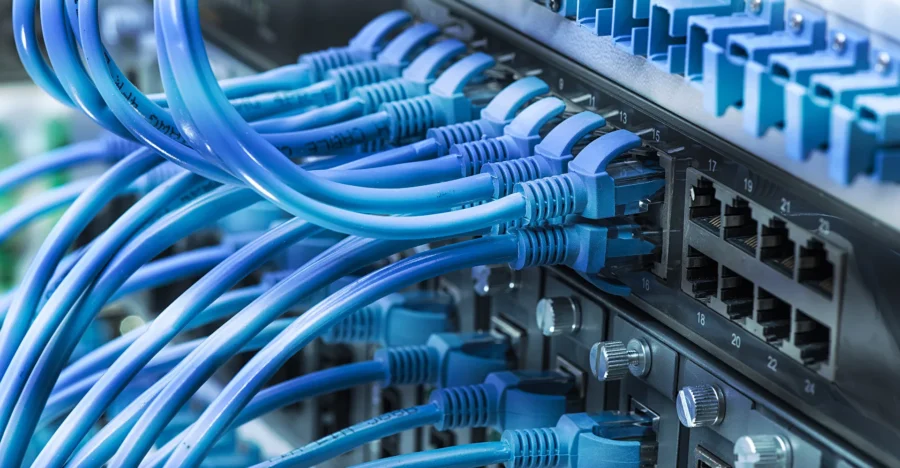
Build the right connections
A useful network starts with your layout, connected devices and everyday activity. Review wired connections and wireless coverage together before selecting equipment.
Plan cable runs and outlets for workstations, access points and compatible security equipment. Discuss suitable cable types, termination and agreed link checks.
Review access point placement around room layouts and device needs. Assess existing coverage and configure a suitable wireless setup for the agreed areas.
Select and configure equipment around connection needs, port capacity and supported features. Include compatible PoE requirements where connected devices need it.
Planning a network for cameras? Explore our IP camera installation service . Network performance depends on equipment, cabling, device demand and the internet service available at the property.
Plan around everyday use
Your layout and connected devices shape the network. Review where people work, which areas need Wi-Fi and which equipment benefits from a wired connection.
Plan connections around home offices, shared living spaces and compatible smart or security devices.
Review staff devices, work areas and connected equipment. Plan cabling and network capacity around current needs and expected additions.
Review before installation
A clear assessment helps identify equipment, cable routes and configuration work. Share existing connection problems and the areas you want included.
Identify computers, access points, cameras and other connected equipment. Review device locations and the activity the network needs to support.
Review router, switch and access point models along with existing outlets and cabling. Check what can be retained within the proposed setup.
Plan practical routes and outlet positions. Identify installation access, visible cable management and any work requiring separate arrangements.
Review required coverage areas, building layout and existing weak spots. Discuss access point placement and how coverage will be checked.
Count required wired connections and review compatible PoE needs. Match switch capacity and power availability to the proposed devices.
Review the internet service and provider equipment separately from the local network. Agree on installation, configuration and handover tasks.
Planning a new network or an upgrade? Share your city, property layout and device requirements to discuss suitable equipment and installation work.
Discuss Your Network Installation →Plan coverage around real use
Review coverage, device demand and equipment placement together. A suitable plan considers how the building and connected devices affect wireless performance.
Plan locations around the rooms and floors needing coverage. Consider walls, mounting access and a suitable wired connection where required.
Review where users connect and which applications matter. Match equipment and configuration to the devices and activity expected in each area.
Set up agreed wireless networks and access settings. Check connections in priority areas and review any remaining limitations at handover.
Connecting security cameras? Explore our IP camera installation service . Choose wired or wireless connections around equipment compatibility and site conditions.
Know what the project includes
A clear proposal identifies connection points, equipment and configuration work. Confirm installation access, checks and handover details before work begins.
List the required connection points and practical cable routes. Agree on outlet positions, visible cable management and any access restrictions.
Specify suitable cable and connection components for the project. Include installation, termination and identification of agreed cable runs.
Plan router, switch and patching locations. Discuss mounting, available power and space for maintaining connections or adding equipment.
Define the router, switch and access point setup included. Confirm supported access settings and who manages the equipment after handover.
Agree on cable and device checks and any documentation required. Confirm separately if formal cable certification reports are part of the proposal.
Review connection labels, equipment details and everyday use. Discuss support scope and arrange secure transfer of any required administrative access.
Get a plan for your connections Share your city, required outlets and connected devices to discuss cabling, equipment and setup.
Request a Networking Quote →Designed around everyday connections
Property-specific planning brings connection points, wireless coverage and equipment organization together. Choose a setup that supports your current devices and practical future additions.
Place agreed data outlets around workspaces and connected equipment. Plan wireless access for the rooms and areas people use most.
Use suitable equipment locations, cable management and labels. Clear organization makes connections easier to identify during maintenance or changes.
Discuss spare ports, cable routes and available power for expected devices. Review expansion needs before selecting switches and other equipment.
Understand the installed equipment, included configuration and support scope. Keep connection details and access responsibilities available for future work.
From requirements to handover
Start with the property layout and device needs. Agree on connection points, equipment and configuration before installation, then check the included functions.
Send your city, property type and required wired or wireless areas. Mention existing equipment, connection problems and devices you plan to add.
Assess cable routes, outlet positions and access point locations. Review equipment compatibility and practical installation access.
Confirm connection points, equipment and configuration tasks. Specify the checks, documentation and any additional work included in the quote.
Install agreed cabling and equipment, label connections and configure supported functions. Perform the connection and coverage checks included in the scope.
Go through equipment locations, connection details and everyday use. Arrange secure administrative access handover and explain agreed support arrangements.
Ready to plan your network? Share your layout and device requirements to discuss installation options and availability.
Start Your Network Installation →Understand your project quote
A quote should reflect connection points, equipment and installation work. Review the full scope, including configuration and checks, before comparing proposals.
The number of outlets, cable lengths and access to routes affect installation work. Identify any difficult access or additional building work in the proposal.
Router, switch and access point choices depend on device needs and coverage. Port count, compatible PoE requirements and planned additions affect equipment selection.
Included setup, connection checks and documentation affect the scope. Confirm any certification testing, subscriptions or ongoing support charges separately.
Compare the complete proposal: Review cable runs, equipment, configuration, agreed checks and applicable taxes. Confirm exclusions and separate one-time installation costs from ongoing charges.
Find your location
Explore the city networking pages below. Share your property location, connection needs and existing equipment to discuss installation availability.
Planning a network in another area? Send your city and property requirements to discuss service availability.
Check Networking Availability →Your questions answered
Understand equipment choices, coverage and project scope before planning a network installation for your property.
That depends on device locations, mobility and the property layout. Wired connections can suit fixed equipment, while Wi-Fi supports mobile devices. Many projects use both, with the final design based on your requirements.
Share equipment models and details of the existing installation. Reuse depends on condition, compatibility and whether the equipment supports the proposed setup. The quote should identify any replacements or additional components.
Local network improvements may address coverage or connection bottlenecks, but they do not increase the speed supplied by your internet provider. Results also depend on connected devices, equipment and how the network is used.
Choose cable and connection components around the required links, installation conditions and planned equipment. Discuss suitable options in the project proposal rather than selecting by cable category alone.
Camera connections can be included in the network plan. Review device compatibility, switch ports, recording connections and any PoE requirements. Explore our IP camera installation service for the camera setup.
Confirm the checks and documentation included in your proposal. Connection checks and formal cable certification are different scopes, so specify certification reports before agreeing to the work if they are required.
Include your city, property type, required outlets and Wi-Fi areas, device count and existing equipment models. Mention any connection problems. Do not send network passwords or administrative credentials through the enquiry form.
Plan your next step
Tell Kancam about your property, devices and connection needs. Discuss suitable cabling, equipment and configuration with a clear installation scope.
Keep passwords and administrative credentials out of your enquiry. Access arrangements can be discussed separately.
